Лучшие настройки для Marvel Rivals: увеличение количества кадров и уменьшение задержки ввода
Освоение Marvel Rivals: оптимизация настроек для достижения максимальной производительности
Marvel Rivals — это захватывающие и динамичные сражения с участием знаменитых героев Marvel и потрясающей графикой. Несмотря на хорошую оптимизацию, точная настройка параметров может значительно улучшить плавность и контроль игрового процесса. В этом руководстве подробно описаны настройки дисплея, графики и звука, чтобы максимально раскрыть потенциал вашего оборудования и раскрыть своего внутреннего супергероя.
Примечание: Настройки, не упомянутые здесь явно (привязки, доступность, социальные сети), оставляются на усмотрение личных предпочтений.
Marvel Rivals: оптимальные настройки отображения
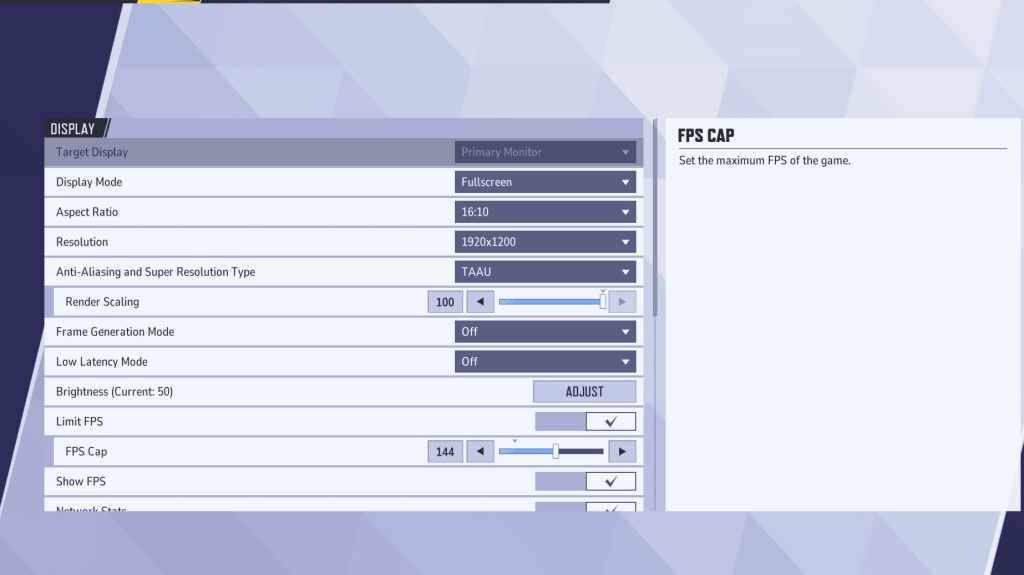
Начните с основных настроек дисплея. Полноэкранный режим рекомендуется для серьезных геймеров, поскольку в нем все системные ресурсы используются для игры, максимально повышая FPS и сводя к минимуму отвлекающие факторы. Оконный режим без рамок упрощает многозадачность, но может снизить частоту кадров и вызвать задержку ввода.
| Setting | Description | Best Setting |
|---|---|---|
| Display Mode | How the game is displayed. | Fullscreen (prioritizes performance); Borderless Windowed (easier multitasking) |
| Resolution | Screen resolution. | Native Monitor Resolution |
| Aspect Ratio | Game display width and height. | Native Monitor Aspect Ratio |
| Anti-aliasing & Super Resolution | Anti-aliasing and resolution scaling technologies. | Experiment to find optimal balance between visuals and performance. |
| Frame Generation | Frame generation technology. TAAU is generally safe, experiment for best results. | Off |
| Low Latency Mode | Reduces input lag (Nvidia GPUs only). | On + Boost (if available) |
| V-Sync | Synchronizes frame rate with monitor refresh rate. May introduce input lag. | Off |
| Limit FPS | Caps maximum frame rate. | Monitor's refresh rate |
| Show FPS | Displays FPS on-screen. | On |
| Network Stats | Displays network statistics. | On |
Marvel Rivals: оптимальные настройки графики
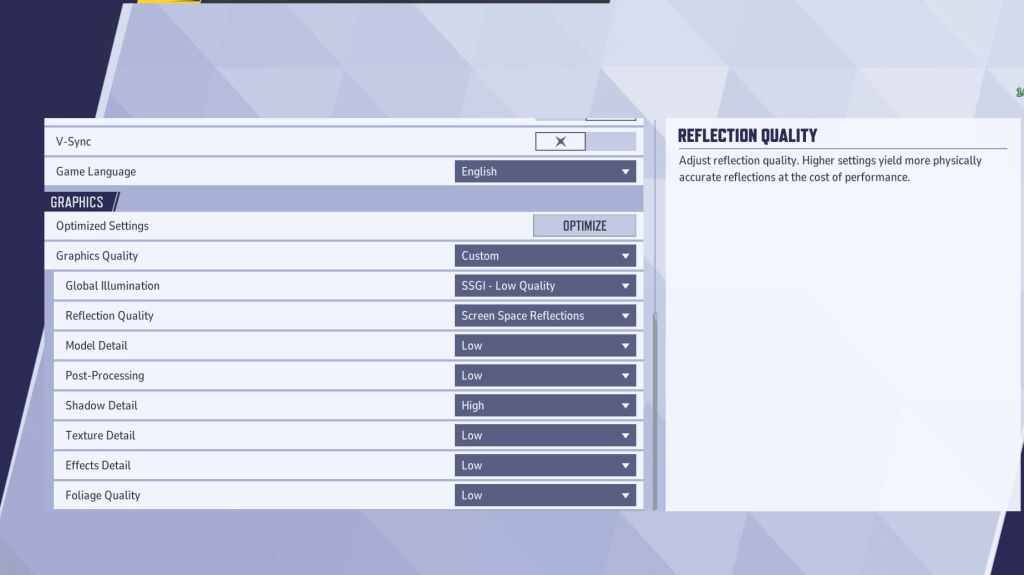
Настройки графики сильно влияют на производительность. В соревновательной игре отдавайте предпочтение производительности, а не визуальной точности, установив для большинства значение «Низкий» для более плавного и отзывчивого игрового процесса. Компьютеры высокого класса могут поддерживать настройки «Средний» или «Высокий» для улучшения качества изображения.
| Setting | Description | Best Setting |
|---|---|---|
| Graphics Quality | Preset adjusting multiple visual settings. | Custom |
| Global Illumination | Simulates light bouncing; higher settings are more realistic but demanding. | SSGI – Low Quality |
| Reflection Quality | Clarity and realism of reflections. | Screen Space Reflections |
| Model Detail | Complexity and realism of character and object models. | Low |
| Post-Processing | Additional visual effects (motion blur, depth of field). | Low |
| Shadow Detail | Sharpness and quality of shadows. | High |
| Texture Detail | Resolution of in-game textures. | Low |
| Effects Detail | Quality of visual effects (explosions, ability animations). | Low |
| Foliage Quality | Density and detail of environmental elements (grass, trees). | Low |
Отключите ускорение мыши как в игре, так и в настройках Windows, чтобы повысить точность прицеливания.
Marvel Rivals: оптимальные настройки звука
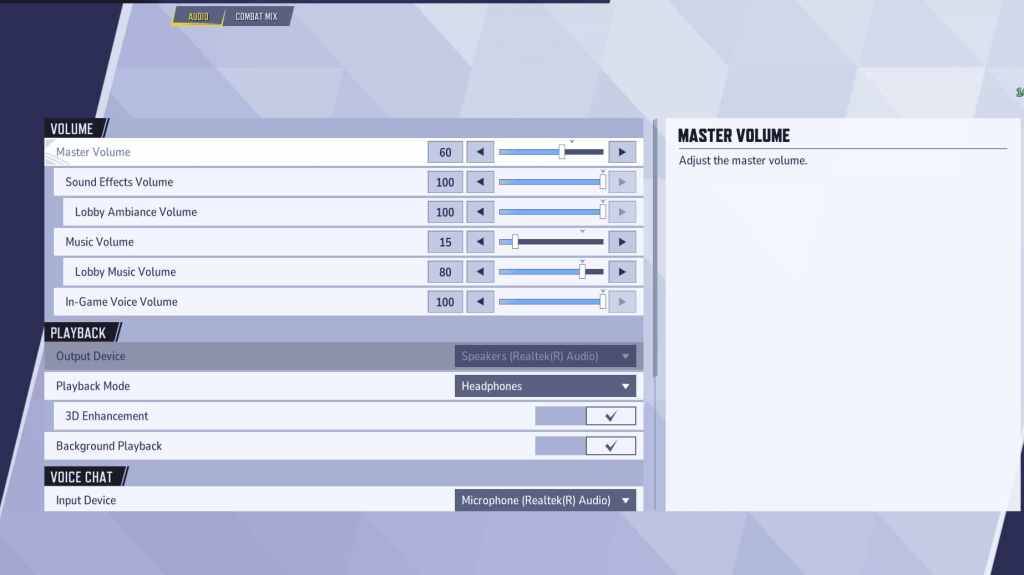
Аудио существенно влияет на игровой процесс. Включите 3D Enhancement, чтобы улучшить пространственный звук и помочь точно определить позиции и способности противника. Используйте HRTF (если доступно) для улучшения звуковых сигналов. Отрегулируйте уровень громкости по своему усмотрению.
Далее: откройте для себя лучшие командные способности в Marvel Rivals!
Последние статьи
Трендовые игры






Главные новости
](https://images.dyk8.com/uploads/18/17380116246797f3e8a8a39.jpg)

Последние игры